ADW Cleaner quarantine separates selected detections from normal use while retaining supported recovery options. Understanding the difference between restore and delete helps you avoid losing an application you still need.
Why quarantine matters
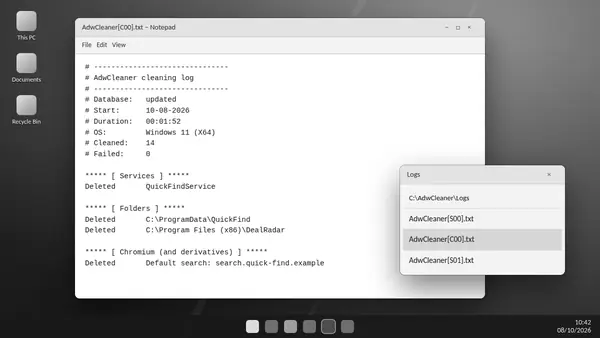
Cleaning can affect files, registry entries and unwanted preinstalled software. Quarantine provides a place to review those changes. Logs and quarantine data are generally kept within the utility's working directory, commonly C:\AdwCleaner.
When restoration makes sense
A legitimate application may stop working after one of its components is quarantined. Compare the cleaning log with the time the problem began and confirm the item belongs to software you trust. Restoring an unwanted item can also bring back the original problem.
Recover a reviewed item
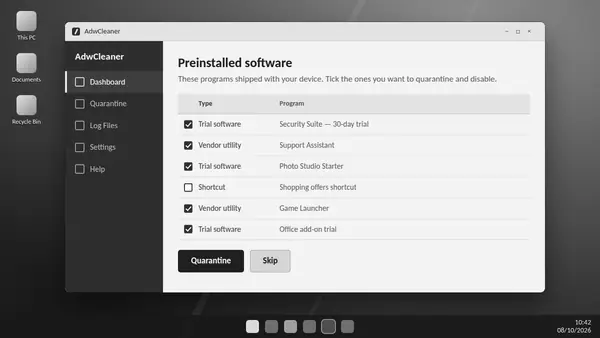
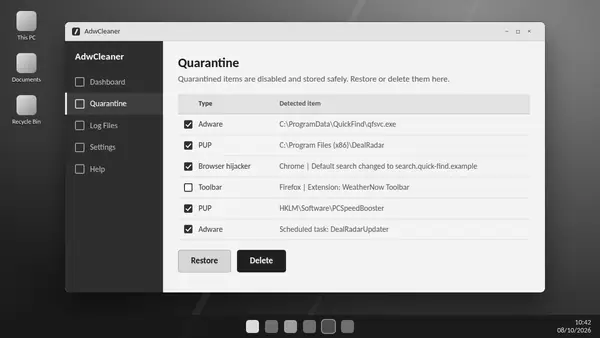
The Quarantine area lists supported items and preinstalled software. Select only the entries you have checked and use the restore action. Follow any restart request, then confirm the application behaves normally.
Permanent deletion needs a separate decision
Deletion removes quarantined data rather than returning it to the system. Keep recoverable items while you assess the clean-up. Once you are certain they are unnecessary, deletion can clear retained data; the action cannot be reversed through quarantine.
Use exclusions carefully
An exclusion can prevent a trusted item from appearing in later scans. Verify the source before excluding it and avoid broad exclusions. Suspected incorrect detections can be reported to Malwarebytes for review.
Before removing the utility
Review quarantine and save any reports you need before removing ADW Cleaner and its working data. Recovery depends on the relevant quarantine information still being available.